...
Career & Skills

3D Visualizer — Role, Workflow, Tools & Career (2025 Guide)

Learn what a 3D visualizer does, their workflow, top tools (Blender, V-Ray, D5), career path and salaries, and how to build a portfolio that ranks in search.

TT
TEELI Team
TEAM
3D Visualization Specialists
Jan 12, 2025
11 min read
Share this article:
Professional 3D visualizer workspace setup showing dual monitors with architectural modeling viewport, photorealistic rendering output, graphics tablet and color-calibrated display for visualization work 2025

What is a 3D Visualizer?

A 3D visualizer transforms architectural, product, or design data into photoreal images, animations and interactive experiences. They bridge design intent and audience understanding by producing visuals used for client approval, marketing and construction coordination.

Why 3D Visualizers Matter Now

3D visualization converts technical drawings into persuasive imagery. For architecture, real-estate and product commerce, high-quality visuals increase engagement and accelerate decisions. The visualization software market is growing rapidly, driving demand for skilled visualizers and faster real-time pipelines. Learn more about the complete 3D rendering process for houses to understand end-to-end workflows.

Core Responsibilities (what firms expect)

Modeling: Convert CAD/Revit drawings into clean 3D geometry.
Materials & Texturing: Create PBR materials and realistic texture maps.
Lighting & Camera: Set natural and artificial lighting, camera composition for realism.
Rendering & Post: Generate high-res stills and do color grading, compositing.
Optimization & Delivery: Prepare GLB/FBX/OBJ for web/AR/VR or optimized stills for web. For detailed guidance on creating 3D room models, see our comprehensive workflow guide.
Collaboration: Coordinate with architects, BIM teams, marketers and developers. Working with 3D building designers requires understanding their technical requirements and design language.

Job descriptions and career pages emphasize this hybrid technical-creative role.

Skills & Competencies (SEO-friendly list)

Essential skills recruiters search for:

3D modeling: 3ds Max, Blender, Rhino.
Rendering engines: V-Ray, Corona, D5 Render, Twinmotion, Lumion.
Real-time engines: Unreal Engine, Unity for VR/AR.
Texturing: Substance 3D, Quixel Megascans, Photoshop.
Lighting & composition: Camera lenses, exposure, color grading.
Optimization: LODs, polygon reduction, bake maps for real-time.
Soft skills: Version control, client communication, brief interpretation.

Industry job guides and skills lists confirm these are high-value search terms and hiring filters.

Tools & Tech Stack (what to include on a portfolio page)

Group assets by purpose. Use these anchor keywords and tools on your pages to match SERP intent:

Modeling: Blender, 3ds Max, SketchUp.
Offline rendering: V-Ray, Corona, Arnold.
Real-time / Fast iteration: D5 Render, Lumion, Twinmotion, Enscape.
Post & compositing: Photoshop, After Effects, DaVinci Resolve.
AR/Web export: GLB/GLTF, USDZ, Sketchfab viewers.
Professional 3D visualization software tools comparison 2025 featuring Blender Cycles GPU renderer, V-Ray photorealistic ray tracing engine, D5 Render real-time visualization platform and Unreal Engine 5 for architectural visualization workflow

Chaos and tool vendor resources list these as top visualization stacks; highlight them in headings and image alt text for SEO.

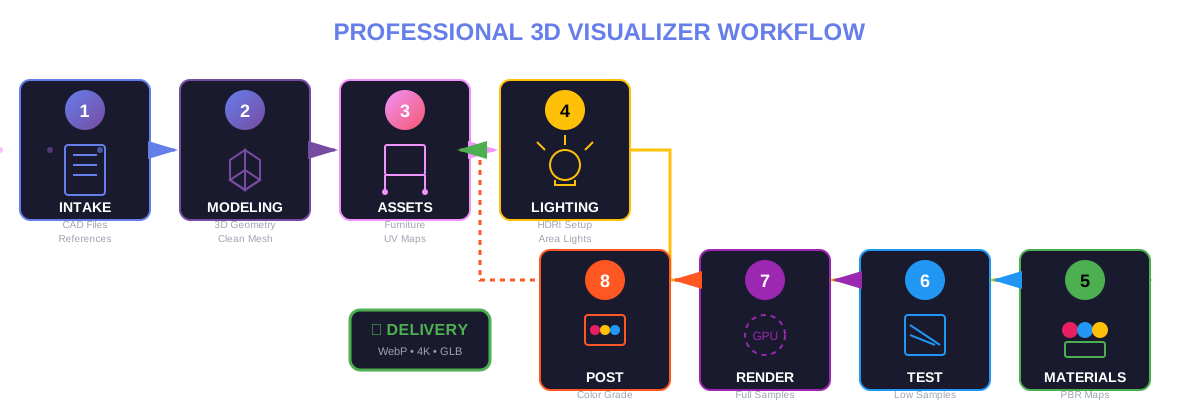
Typical 3D Visualizer Workflow (step-by-step)

1. Intake & References

Receive CAD/Revit, moodboards, material lists, camera directions.
Confirm dimensions, client KPIs (LCP, hero shot, social crops).

2. Blocking / Modeling

Build base geometry.
Name layers and objects clearly for handoffs.

3. Asset Placement & UVs

Import furniture or kitbash assets.
UV unwrap critical objects.
Use PBR maps.

4. Lighting Pass (iterative)

Start broad (HDRI, sunlight).
Add fill lights and IES profiles for fixtures.

5. Material & Detail Pass

Tune roughness/specular, add micro-imperfections, decals and AO bakes.

6. Test Renders & Optimization

Low-sample tests for composition.
Bake lightmaps or proxy assets for big scenes.

7. Final Render & Denoise

Full sample, denoise, render layers (beauty, z-depth, AO, masks).

8. Post-production

Color correct, add bloom, lens effects, and composite people/cars/grass.

9. Delivery

Provide source, web-ready images (WebP, AVIF), and interactive exports (GLB, MP4).
Complete 8-step 3D visualizer workflow pipeline from CAD modeling to post-production delivery showing geometry creation, PBR material texturing, HDRI lighting setup, camera framing, GPU rendering with denoising and color grading for architectural visualization projects 2025

Showcasing Work — SEO & CRO tactics for portfolio pages

To rank and convert, structure each project page like this:

H1: Project name + primary keyword (e.g., "Modern House — Architectural 3D Visualization by [Studio]")
Short lead (40–60 words) that includes the main query and outcome.
Hero image (1600–2400px) with filename and alt text using the primary keyword.
Project gallery: Mix webp stills + 30–90s teaser video.
Case study section: Brief brief → challenge → solution → outcome (impressions, CTR uplift).
Downloadable asset pack or behind-the-scenes (zip) for professionals.
FAQ block answering PAA style queries for that project.
JSON-LD: Article + ImageObject + VideoObject + FAQ.

This structure captures featured snippets, PAA boxes and image pack intent.

Pricing & Market Signals (what clients search for)

Pricing varies by region, complexity and deliverable set. Use search phrases clients use:

"3D visualization price per image 2025"
"Architectural render cost interior vs exterior"
"Interactive 3D walkthrough pricing"

Market reports show visualization and rendering markets expanding, supporting higher rates for real-time and interactive deliverables. Quote a rate range on your services page but also offer packages (Starter, Studio, Premium) to match search intent.

Career Path & Salary (SEO keywords: 3d visualizer salary 2025)

Common search intents here are "how much do 3D visualizers earn" and "how to become a 3D visualizer."

Junior / Freelance: Portfolio projects & small jobs.
Midlevel: Studio roles with full project ownership.
Senior / Lead: Pipeline design, client management, high-value projects.

Salaries differ by country and demand; include localized pages (e.g., "3D visualizer salary UK 2025") to capture regional traffic. Job and industry pages confirm steady demand and typical salary bands.

SEO-Ready Project Page Checklist (copy + paste)

Title includes primary keyword.
First paragraph defines role within 40–60 words (target featured snippet).
At least one H2 answer to common PAA questions.
3–5 images with alt text, WebP format, srcset responsive sizes.
One tutorial or behind-the-scenes video (MP4 + YouTube).
FAQ JSON-LD block (3–6 Qs) tuned to PAA.
Internal links to pillar content (3D Rendering of a House, Room 3D Model).
Page loads under 3s; lazy-load gallery.

This checklist matches SERP features and improves snippet chances.

Advanced Opportunities — Real-time, AR & Agentic AI

Real-time engines and AI are reshaping the role:

Real-time visualization (Unreal, D5) lets clients interact and stream high-quality scenes.
AR/GLB delivery enables product and room previews on mobile.
AI tools speed asset creation, material generation and lighting presets, but human judgement remains essential for composition and E-E-A-T.

Market signals show AI accelerating workflows but not replacing skilled visualizers.

FAQ — People Also Ask