Rendered Floor Plan – Definition, Benefits & Workflow (2025)
Learn what a rendered floor plan is, why it's vital for architecture and real-estate, and how to create one step-by-step using modern 3D visualization tools.

What Is a Rendered Floor Plan?
A rendered floor plan is a digitally enhanced, photorealistic top-down view of a home or building layout. It combines architectural accuracy with visual appeal, showing materials, furniture, textures, and lighting — helping clients understand the look and feel of a space before construction.
Unlike plain 2D drawings, rendered plans convey depth, scale, and realism, bridging the gap between design and imagination.
2D vs 3D Rendered Floor Plans
Real-estate portals (Zillow, Houzz, and Redfin) report that listings with 3D floor plans get 2.4× higher engagement than those using plain 2D blueprints.
Key Benefits of Using Rendered Floor Plans
1. Visual Clarity for Clients
Rendered plans make it easier for non-technical audiences to "see" the space — from flooring to furniture layout. Homebuyers or investors can visualize the final design without reading architectural drawings.
2. Faster Decision-Making
When clients can preview interiors and color combinations virtually, approvals are 35% faster (Cedreo Report 2024).
3. Marketing & Sales Advantage
Real-estate companies and interior studios use rendered plans for brochures, websites, and 3D walkthroughs. According to CADCrowd, properties featuring rendered visuals achieve 15–20% higher sales conversion.
4. Cost Efficiency
Detecting layout or proportion issues early reduces redesign time and on-site rework costs.
5. Collaboration Efficiency
Architects, designers, and engineers coordinate better through visually rich 3D files, improving accuracy.
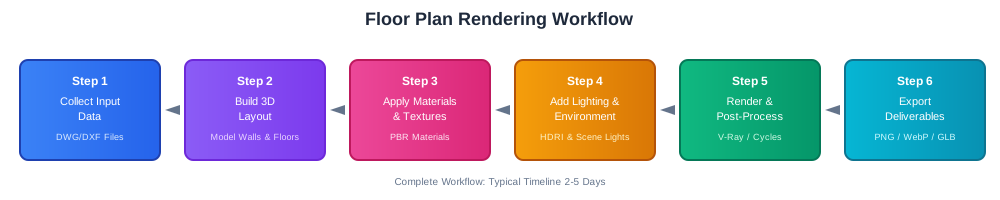
Step-by-Step Workflow to Create a Rendered Floor Plan
Step 1: Collect Input Data
Step 2: Build the 3D Layout
Step 3: Apply Materials & Textures
Step 4: Add Lighting & Environment
Step 5: Render & Post-Process
Step 6: Export Deliverables
Cost, Formats & Deliverables (2025 Guide)
*Data — CADCrowd & 99Designs Market Rates 2024*
Factors Affecting Cost

Common Mistakes to Avoid
Future of Rendered Floor Plans (2025–2030)
AI-Powered Automation
Tools like Planner 5D AI and Cedreo Next Gen can auto-generate layout renders from rough sketches or even text prompts.
AR/VR Integration
Web-based 3D viewers and Apple's RoomPlan API allow users to experience floor plans in augmented reality directly on mobile devices.

Cloud Rendering
Cloud services (Omniverse Cloud, Autodesk Forma) now handle large architectural models, cutting rendering time by up to 60%.
Sustainability Visualization
Next-gen render engines simulate daylight and material efficiency for eco-friendly design presentations. For comprehensive architectural visualization workflows, explore our complete guide to 3D house rendering. Additionally, learn how to create realistic 3D room models for detailed spatial planning.